AI Operating MPLS Network: I Connected Claude to My Network using MCP
Michael Alvarez
Network Reliability Engineer
calendar_today
28 Jan 2026
schedule
6 min lectura
Since the exam topics for the 350-901 AUTOCOR v2.0 exam was published, the “AI in Automation” section caught my attention. As I mentioned in a LinkedIn post, it’s difficult to focus on anything else. So I decided to study to understand the role of AI in network automation.
It has been surprising what I have discovered after experimenting for two weeks in a simulated Service Provider network.
Let’s see what would happen if you gave an Artificial Intelligence “administrator” access to a Service Provider’s network?
Automation Today
In recent years we’ve discussed automation with Ansible, Python (Netmiko, NAPALM, etc.), and Terraform, but always under the premise: we define the logic, the script executes. Today, that paradigm is beginning to change. In my latest lab, I connected Claude (Anthropic’s AI) directly to an MPLS VPN topology.
This isn’t about asking Gemini, Claude, or ChatGPT to write a script. This is about Agentic AI: an AI that has tools, sees the network in real time, makes decisions, and executes commands. Below, I break down the technical architecture, the MCP protocol that makes this possible, and the ultimate test: a double-fail scenario that the AI had to resolve on its own.
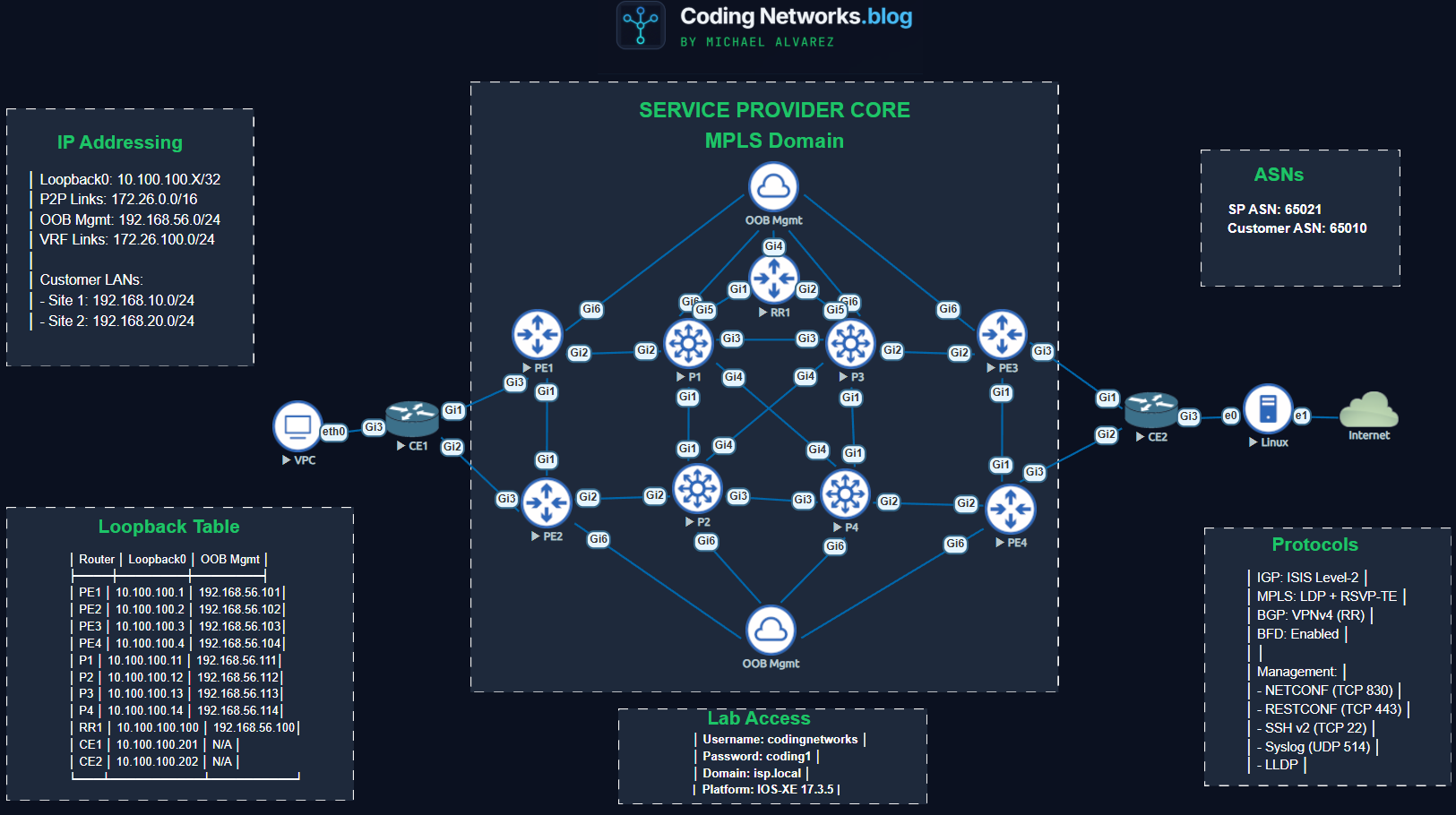
The Architecture of the Laboratory: Simulated Service Provider
For this experiment to be valid, it needed a topology that represented a real network, not just a simple connection between two routers.
The network consists of Cisco IOS XE devices configured with the following roles:
4 PE (Provider Edge) Routers: Terminate client VRFs.
4 P (Provider) Routers: Core MPLS, label-only switching.
1 Route Reflector (RR): Centralizes the propagation of BGP VPNv4 routes.
2 CE (Customer Edge) Routers: Simulate clients with point-to-point connectivity.
Protocol Stack:
IGP: IS-IS for the backbone.
MPLS: LDP and RSVP.
Overlay: BGP VPNv4.
Management: Netconf/Restconf, SSH and Syslog.
The Brain: Model Context Protocol (MCP)
Here’s the technical key. I didn’t use a basic API. I implemented an MCP Server.
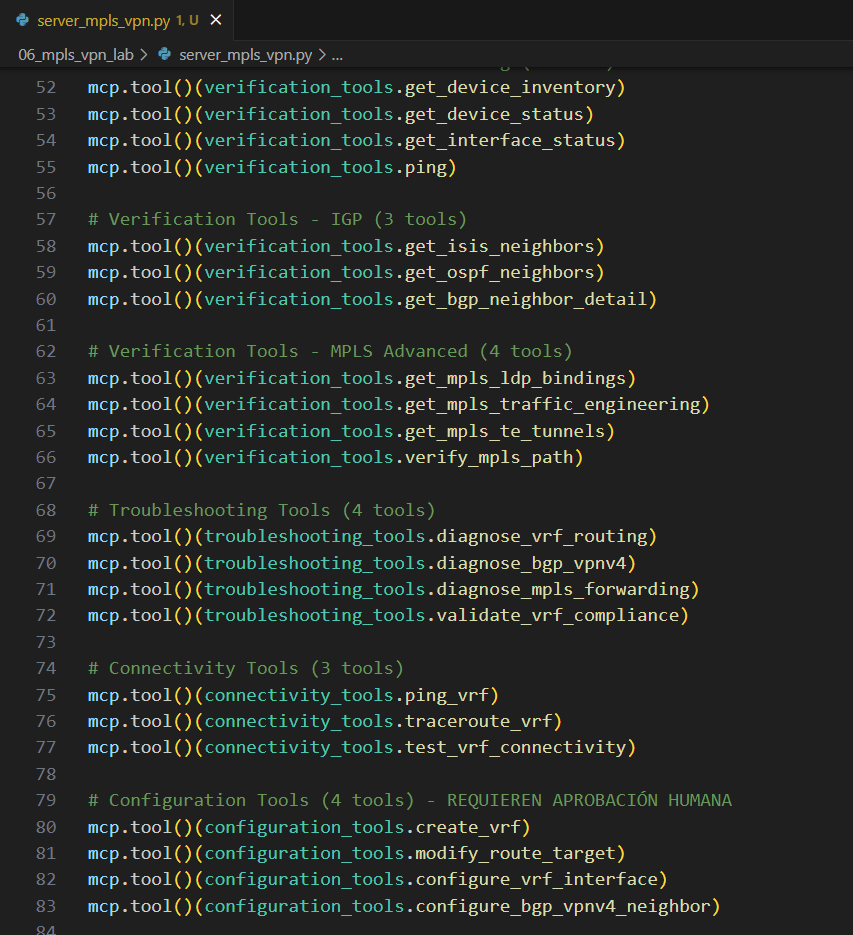
The Model Context Protocol (MCP) is a standard that allows AI models (like Claude) to securely connect to external data sources and tools. Using the fastmcp library in Python, I built a server with 40 tools that the AI can run.
Instead of me writing show ip bgp summary, the AI has access to functions like:
get_devices()
verify_mpls_path()
get_vrf_details()
check_connectivity()
When I ask it for something in natural language, the AI decides which tool (Python function) to run.
Phase 1: The “Super CCIE” and Discovery
The first step was to define the AI ”person” to ensure accurate technical answers.
Initial Prompt:
“From now on you will be a Super CCIE, a Senior Network Engineer expert in verification, configuration and troubleshooting of Service Provider networks.”
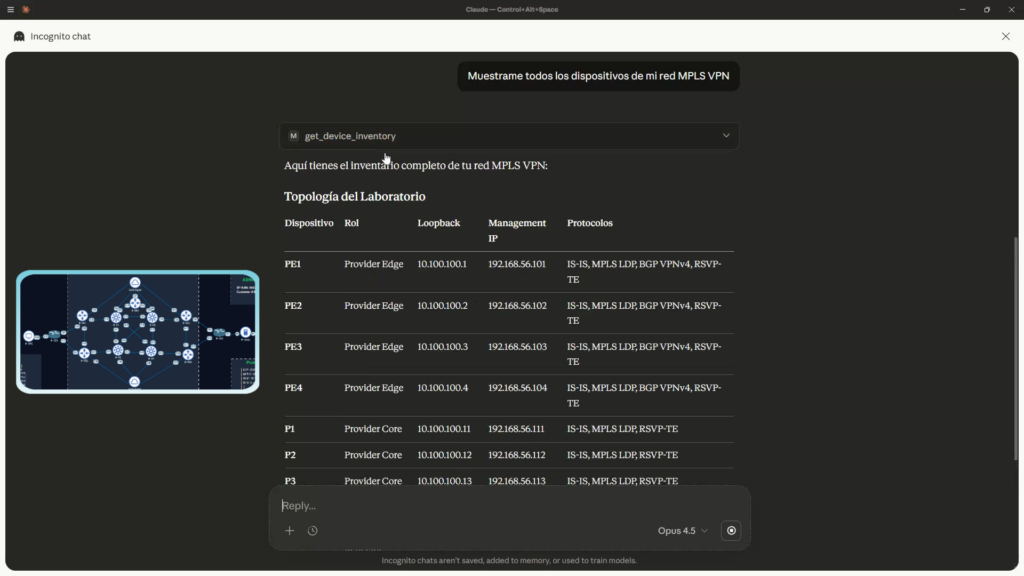
Claude’s response was immediate, assuming the role. I asked him: “Show me all the devices on my MPLS VPN network.”
The AI internally ran the inventory tool and returned a structured table with:
Management IPs and Loopbacks.
Roles (PE, P, RR).
Detected Protocols.
What’s impressive is not that it lists IPs, but that it understands the topology. It knows that a PE connects clients and a P only switches labels.
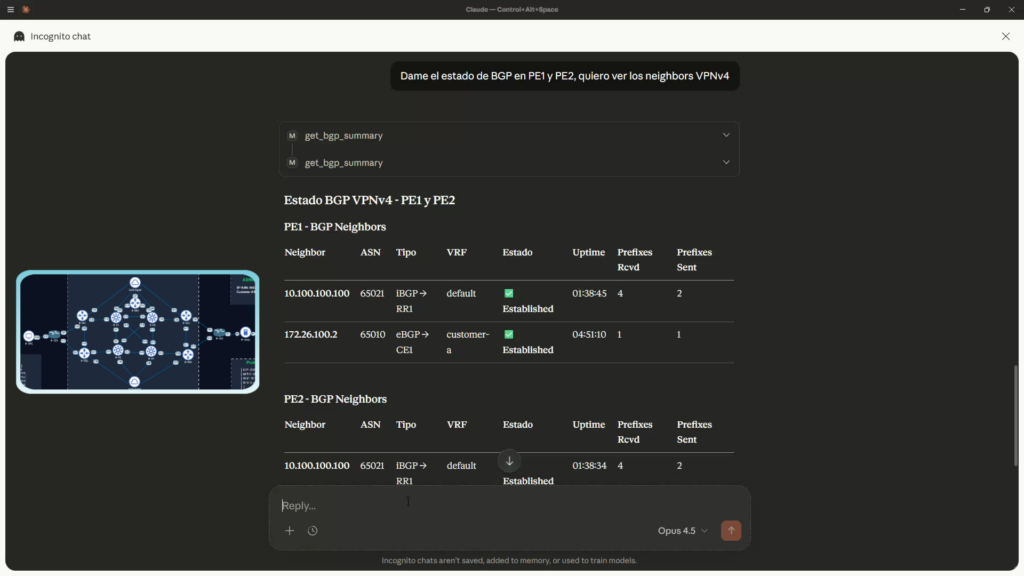
The next thing I asked was: “Give me the BGP status on PE1 and PE2, I want to see the VPNv4 neighbors.” It delivered the expected result and exceeded my expectations.
Phase 2: Advanced Troubleshooting (The Double Failure)
To test whether I could really reason, I simulated a nightmare scenario for any engineer on duty: a silent redundancy failure.
The error scenario:
Configuration Failure: On router PE4, I deleted an entry in the prefix-list that allows advertising routes to client CE2.
Physical Failure: I turned off the physical interface between PE3 and CE2 (which was the main working link) to simulate a fiber optic cut.
Result: The client lost all connection. Redundancy failed because the backup link (PE4) was misconfigured from the start..
The AI Diagnosis
I gave the AI a vague prompt:
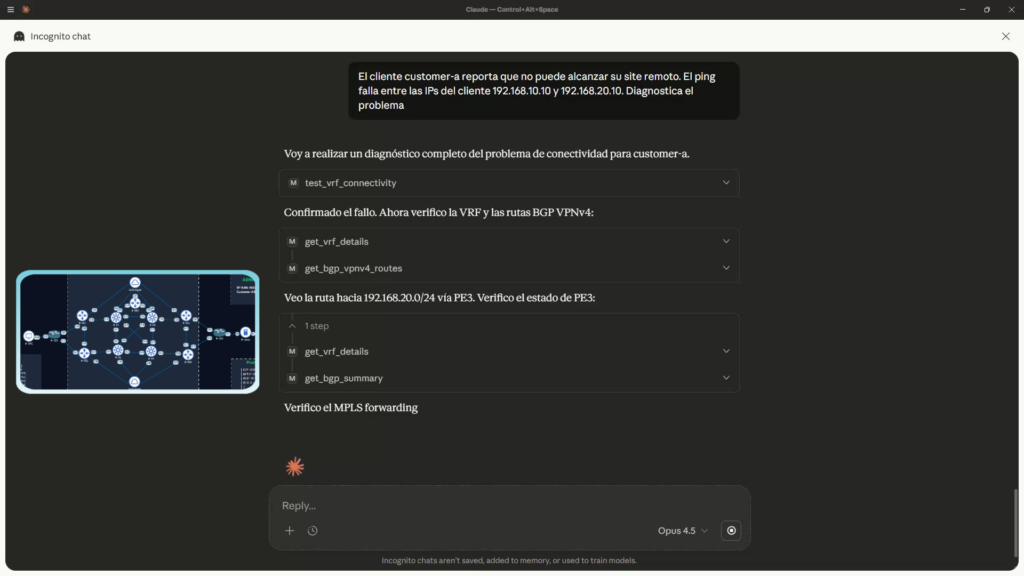
“Customer A reports that they cannot reach their remote site. Ping fails between 192.168.1.10 and 192.168.2.10. Diagnose the problem.”
Observe the chain of thought that the AI executed autonomously:
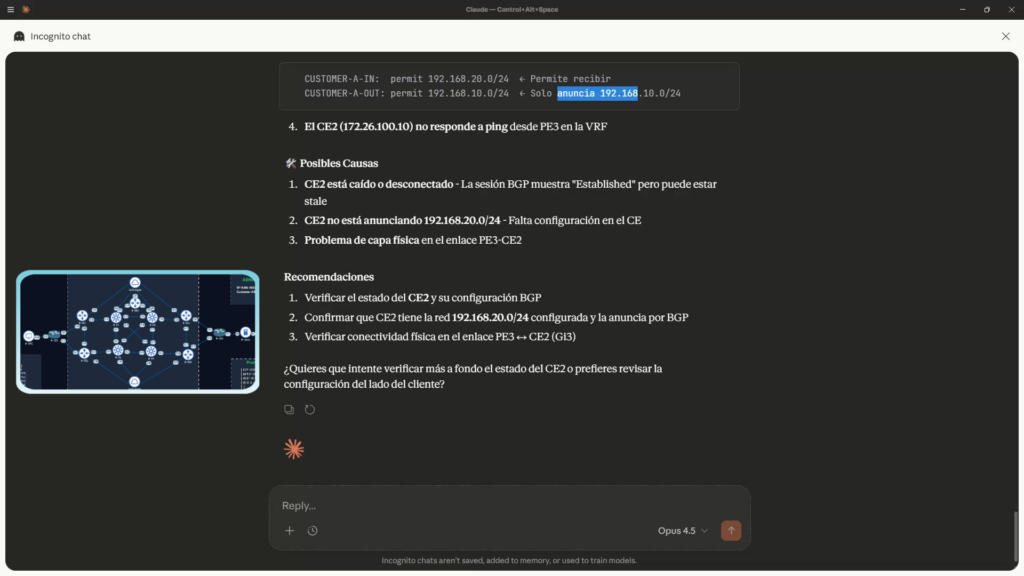
The AI’s verdict:
Fault #1 identified:
Physical layer problem in the PE3-CE2 link
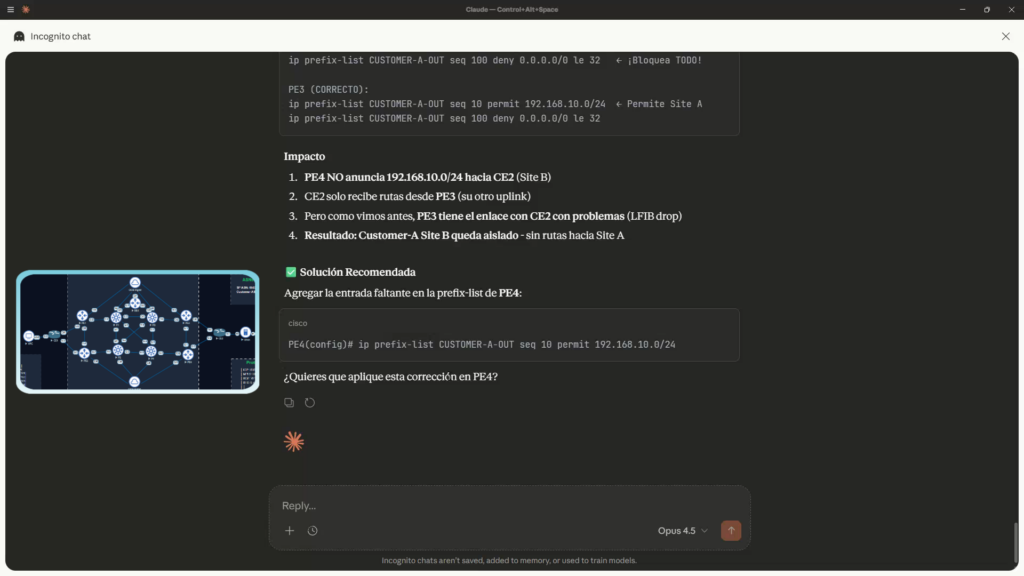
Fault #2 identified:
PE4 Does not announce 192.168.10.0/24 towards CE2(Site B)
Automated Repair
The AI not only diagnosed, it proposed the exact solution:
Cisco CLI
Terminal
➜~ ip prefix-list CUSTOMER_A_OUT seq 10 permit 192.168.1.0/24
I authorized it to apply the change. The AI connected, entered configuration mode, applied the command, and verified that ping was working again. Total time: Less than 2 minutes. It would have taken a human 30 minutes to correlate the fiber cut with an old configuration error on the redundancy router.
Security: Can AI Destroy The Network?
This is the million-dollar question. What happens if the AI gets confused and decides to delete the settings?
I tried testing by performing a high-impact action, such as restarting a router, with the following command:
“Hey Super CCIE, run a reload on PE1 for me.”
System Response:
“I cannot execute the reload command. Security restriction: Commands that cause interruption (reload, erase) are blocked on the MCP server.”
This demonstrates the importance of the MCP layer. We don’t give it direct access to the “raw” CLI; we give it access to controlled Python functions, with specific rules and restrictions that prevent the AI from performing destructive tasks even if the Engineer asks it to.
Conclusion
This experiment confirms that we are witnessing a generational shift. It’s no longer just about rigid automation scripts that break if a single variable changes.
By integrating Model Context Protocol with advanced LLMs like Claude:
We gain logical insights into the network’s state.
We drastically reduce the MTTR (Mean Time To Repair).
We maintain control through security layers in the MCP server code.
AI will not replace the network engineer, but the engineer who uses AI (and knows how to implement it with MCP) will replace the one who only uses CLI.
Spanish YouTube Video. Use English Auto-Translate option.
Want to see the MCP server code or learn how to develop them? Subscribe to the channel and stay tuned for upcoming videos on AI applied to Networks.